Each post in Wide Narrow has a "score", which is the result of a calculation based on the activity and usage of the post. Top-scoring posts are thus the posts that are the most qualified, commented on, summarized, as well as used in the reporting.
Users can interact with a post shown in the Top Scoring Post Widget just as if they were reading the post anywhere else. Users can, for example, edit, drag and drop, comment, and translate the post.
Add the widget
- Go to the Dashboard overview page.
- Click on Widgets and then New Widget to create a shared Dashboard Widget.
OR, to create a widget only available for a specific Dashboard:
Click on a Dashboard tile, then the settings icon (three dots) on top of the dashboard page, and select Manage widgets. - Click the blue Add/New Widget button at the top right of the Dashboard page and select an area to position your widget (top, right, or left).
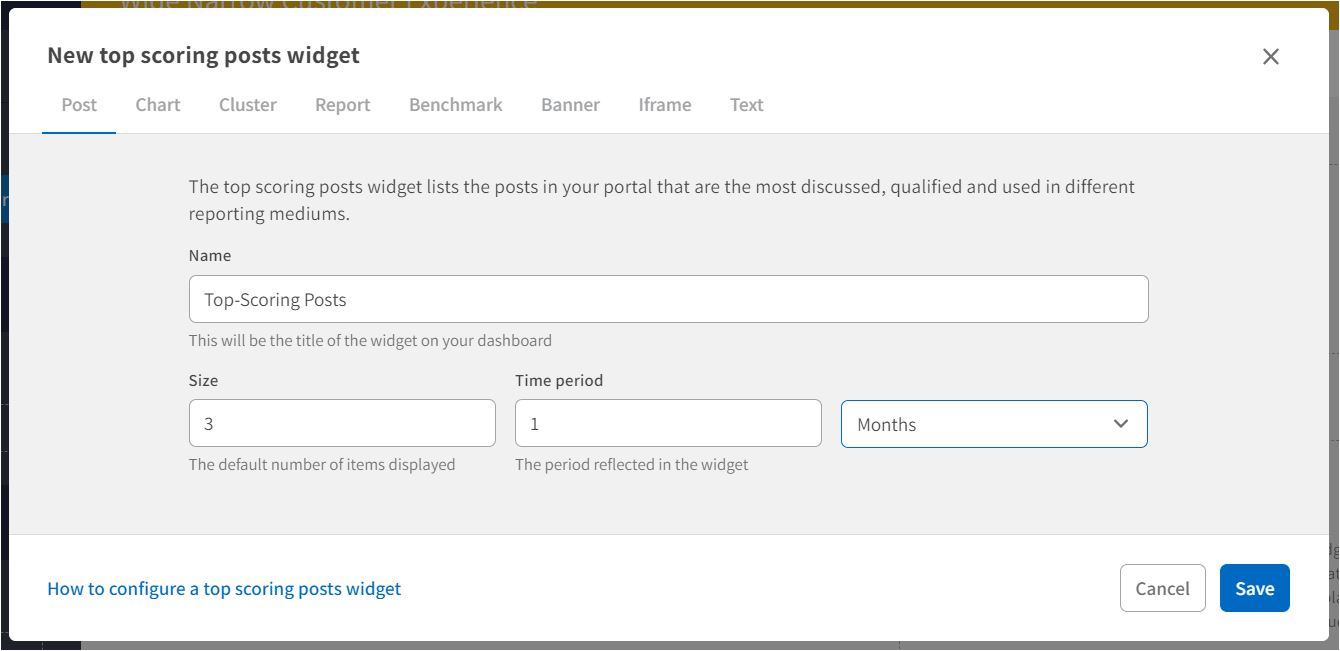
- Click the Post tab in the top menu and then click the Add button on the Top Scoring Posts Widget.
Configuring the widget
- Name: Type the name of the widget. The name will be the title of the widget on the Dashboard. Choose a name that clearly explains the widget, for example, "Top Scoring Posts” or “Most Popular Posts".
- Size: Set the number of top-scoring posts to display in the widget.
- Time period: Select the period to display the top-scoring posts in the widget.
- Press Save. The widget is now available to review on the Dashboard.
User Access:
Only superusers with Admin privileges can create brand new Dashboards. Admins may grant other superusers the authority to modify and update existing Dashboards. Superusers who are permitted to change Dashboards can also add new Dashboard Widgets.
Comments
0 comments
Please sign in to leave a comment.