The Newsletter Widget shows the latest newsletters sent from Wide Narrow. The number of newsletters displayed in the widget is limited to a set number decided when setting up the widget. Users can click on the Newsletters to open and read them on the Dashboard.
You can choose if you want to display newsletters from all or specific newsletters series. The option to select specific newsletter series allows you to customize which newsletters you want to display on different Dashboards.
- Go to the Dashboard overview page.
- Click on Widgets and then New Widget to create a shared Dashboard Widget.
OR, to create a widget only available for a specific Dashboard:
Click on a Dashboard card, then the settings icon (three dots) on top of the dashboard page, and select Manage widgets. - Click the blue Add/New Widget button at the top right of the Dashboard page and select an area to position your widget (top, right, or left).
- Click the Report tab in the top menu and then click the Add button on the Newsletter Widget.

Configuring the widget
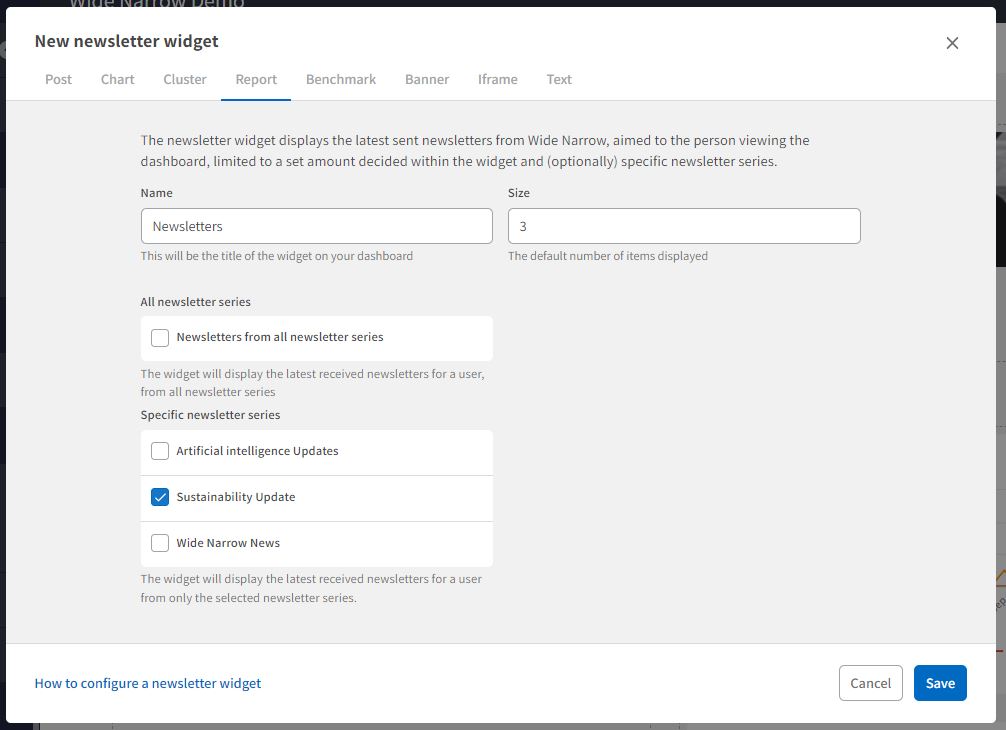
- Name: Type the name of the widget. The name will be the title of the widget on the Dashboard. Choose a name that clearly explains the widget, for example, "Latest Newsletters."
- Size: Set the default number of Newsletters to display in the widget. If there are more sent newsletters than the set number, the user can press a button to load and read more newsletters. The newsletters are shown in chronological order.
- Select if you want to display all available newsletter series or specific newsletter series.
- Press Save. The widget is now available to review on the Dashboard.
User Access:
Only superusers with Admin privileges can create brand new Dashboards. Admins may grant other superusers the authority to modify and update existing Dashboards. Superusers who are permitted to change Dashboards can also add new Dashboard Widgets.
Comments
0 comments
Please sign in to leave a comment.