As you work with your organization's strategic direction, you know you have a lot to learn from the people in your business divisions and regions. What are the common denominators? What's different between the European and the North American markets? Make a structured effort to gather insights from key people across your organization, create a form, or interview them. Have them use the Contribution button in Wide Narrow email a dedicated Inbox, connect a Teams or a Slack channel to your WN inbox, and ensure that the insights you collect from them will not be accessible anywhere else.
Wide Narrow features to use:
Contribute and Email to the portal
Contribute button in Wide Narrow:
Users can contribute to a Wide Narrow portal using the Contribute button in Wide Narrow. This feature requires that the people in your organization have access to Wide Narrow as end-users or super-users.
How to start
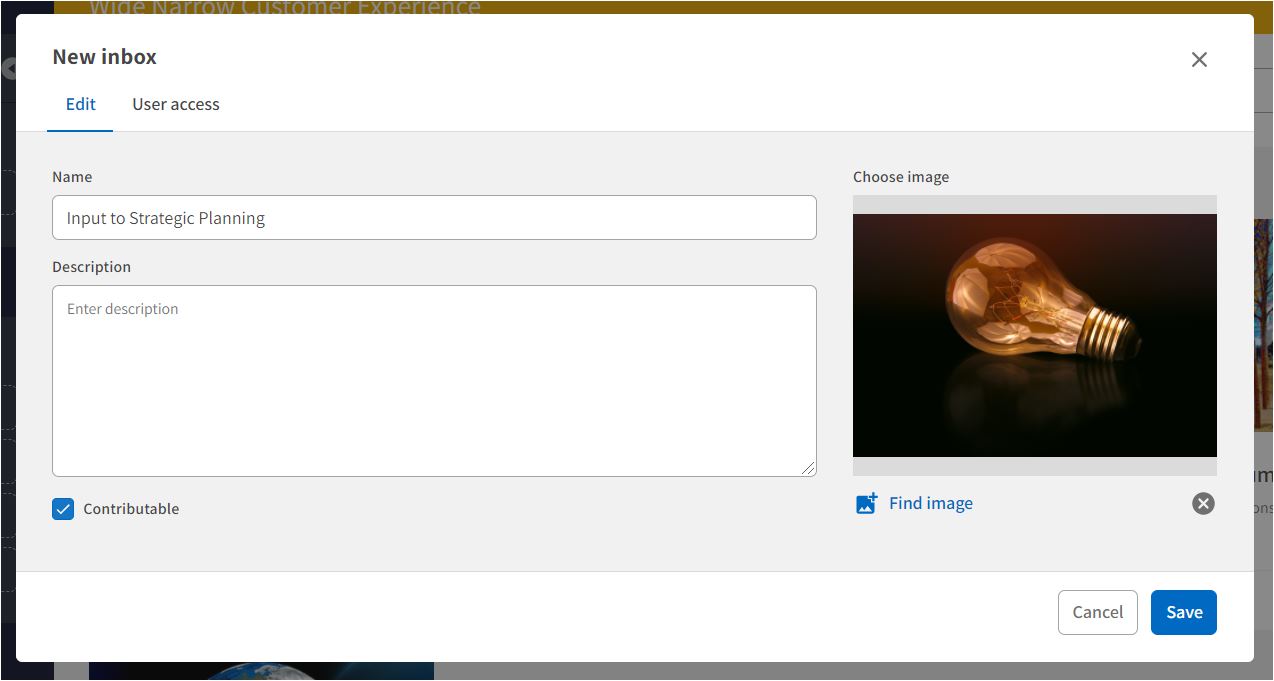
- Navigate to Inboxes and click New Inbox to create an Inbox dedicated to receiving the Contributions. In the New inbox form: Check the Contributable checkbox to make the Inbox Contributable.
- Encourage your colleagues to use the Contribute button in Wide Narrow. Inform your colleagues that they should choose your Inbox to contribute to when filling out the contribution form.
- Check your contribution inbox regularly and use the share post function to thank the contributors.
Email to a dedicated portal Inbox
An easy way for your colleagues to contribute posts is to email a dedicated contribution inbox in your Wide Narrow portal. If the email contains a link to a web page, we will extract the title, abstract, and image and add them to the Contribution.
How to start
- Navigate to Inboxes and click New Inbox to create an Inbox dedicated to receiving the contributions. In the New inbox form: Check the Contributable checkbox to make the Inbox Contributable.
- Click on the mail icon (envelope) in the top banner menu in Wide Narrow to find the email address to your portal in Wide Narrow.
- Add the inbox name as a prefix to the portal address with a dot between the inbox name and portal name (example: ice@sendto.ciportal.com, where "Contributions" is the inbox name and "Ice" is the portal name). Save the address in your email contacts.
- Email strategic questions to your colleagues and encourage them to answer your questions, and share their insights by the inbox-portal email address.
- Check your contribution inbox regularly and use the share post function to thank the contributors.
Comments
0 comments
Please sign in to leave a comment.