Last updated on May 2, 2024
What determines when and how a post is qualified depends on both the user workflow and the portal settings.
The primary purpose of qualifying Posts
The primary purpose of qualifying Posts is to ensure that they are relevant and significant to your organization. Therefore, we recommend that topic experts regularly review their inboxes and actively qualify the most relevant information for the benefit of all. The same principle applies if you qualify posts from Search.
This relevance assurance is vital as qualified and categorized posts are automatically included on dashboards, automated newsletters, Personal Alerts, and other deliverables.
All Superusers with Owner or Writer access to an Inbox can qualify posts in that inbox by using the Qualify button. They can also qualify posts from Search.
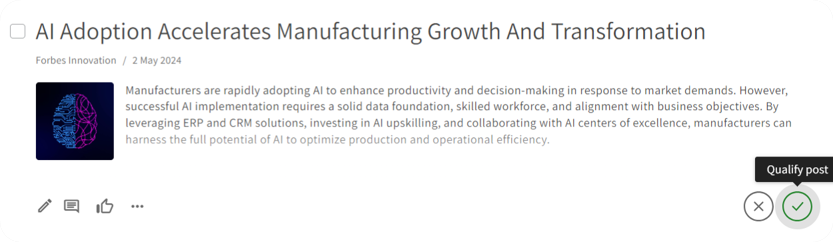
The qualification process differs depending on portal settings
However, the process of qualifying posts may differ based on the portal settings.
Automatic qualification of Posts added to Workspaces from Inboxes
Portal Admins have the ability to enable automatic qualification of all posts added to Workspaces from Inboxes. This means that when posts are added to a Workspaces, they will be automatically qualified without the need for anyone to actively qualify them.
Portal Admins can activate the "Posts added to Workspaces become qualified" option on the General Settings page in the Admin section.
Automatic qualification of Posts in Inboxes
In some cases, Inbox Owners are allowed to set up automatic qualifications in their respective inboxes. This means that parts or all of the inbox content will be automatically qualified without the need for manual action.
InfoDesk Admins can activate this feature on the General Settings page in the Admin section upon customer request.
Allow Contributions to be qualified automatically
Posts added through the Contribute feature can be qualified directly or through a dedicated contribution inbox where designated superusers can review incoming contributions before qualifying them.
When contributions are qualified directly, they are automatically qualified without any "relevance check" from other users.
Portal Admins can activate the "Allow contributions to be qualified" option on the General Settings page in Admin.
User Access: Superusers with Owner or Writer access to Inboxes can qualify posts. Only Superusers with Admin permissions can change the qualification settings in Admin.
Comments
0 comments
Please sign in to leave a comment.